The 3DS Activity Log - Part 2
Part 2 of the 3DS Activity Log series
Harsh Narayan Jha
7 July 2026 ⊙ 8 min read
Hello! It’s been quite some time since the last post on this topic. I have been lucky enough to find some time to work on this project once in a while. Not a lot of progress has been made since, but I think I have something to share. First, let’s cover some technical parts.
Save Data Format
Let’s first tackle the thing we are trying to parse: the Play Time Management (PTM) module save data. The awesome people on GBATemp and resources on 3DBrew were a big help in reverse engineering the files and writing the parser.
I looked up the wiki page outlining the location of every system save file. In the case of PTM, it is located at nand://data/ID0/sysdata/00010022/. By reading, I am expecting two files from this: PlayHistory.dat and Pedometer.dat. There are syscalls for reading these right on the console, so it might be something for the future.
PlayHistory.dat
As stated on the 3dbrew wiki article:
This contains the play log for every title (including the Home Menu and some system applets) launched on the system. The first entry in the file is the oldest, the last entry is the newest. The file is always
0xD5DE8bytes long, regardless of how many entries are in the file. There can be no more than0x11D28entries.
Speaking in plain english, it is about 876kB, with a max limit of 73000 entries. Each entry is of 12B
This is the whole reason for the self-deleting history issue covered in the previous post, the save file acts like a ring buffer. The structure of this binary file is as follows:
| Offset | Size | Description |
|---|---|---|
0x0 |
0x4 |
Start entry index. |
0x4 |
0x4 |
Total PlayHistory entries. |
0x8 |
0xD5DE0 |
0x11D28 PlayHistory entries, 0xC-bytes each. |
Looking at each of the 73k entries, the entry structure is:
| Offset | Size | Description |
|---|---|---|
0x0 |
0x4 |
TitleID-high |
0x4 |
0x4 |
TitleID-low |
0x8 |
0x4 |
Log info (Bits 1-4) and Timestamp (Bits 5-32) |
The first 4 bits in each entry after the TitleID are used to hold information relating to what the log event represents. After this, all log entries are marked with a 28-bit timestamp, measuring the number of minutes since 2000-01-01. Yes, minutes since the year 2000, a classic Nintendo move. The theoretical maximum timestamp value is 2510-05-20 12:15:00. Nintendo took great precautions regarding their own 28-bit Y2K problem, making it literally unreachable.
The C structs representing this, which I used for the parser, look like this:
struct Index {
  uint32_t start_entry;
  uint32_t num_entries;
} __attribute__((packed));

struct PlayEntry {
  uint32_t tidhigh;
  uint32_t tidlow;
  uint32_t extra;
} __attribute__((packed));
In the parser, we read the Index first, then sequentially read index.num_entries entries from the cursor. Reading the title ID is trivial, while the log info and timestamp require some hex tricks and math, respectively:
uint8_t log_info = entry.extra & 0x0000000F;
uint32_t timestamp = (entry.extra >> 4) * 60 + 946684800;
It extracts the 4 bits for the log info, then right shifts by 4 to get the timestamp bits. Multiplying by 60 and adding the Unix timestamp of 2000-01-01 gives us the standard Unix timestamp, which we can easily convert to a human-readable date (and use with everything else today). After that, we just have to parse the timestamp into the user’s timezone. This is necessary because the 3DS has no concept of timezones, users need to set the time manually.
The log info bits are a bit more interesting. Below is the table for each of the lower 3 bits. The 4th bit is always 0 when the tid is a valid title ID. The bits below are ordered from least to most significant.
| Bit | General Meaning | When 0 | When 1 |
|---|---|---|---|
| 1 | Whether the event represents an opening of something or the closing. | opening | closing |
| 2 | Whether the app in question is a Home Menu applet (e.g. the menu itself, game notes, etc.) or a full application (e.g. any game, system settings, etc). | full application | applet |
| 3 | Whether the event corresponds to a resume/suspend or a launch/quit (suspend meaning going to the Home Menu without fully quitting an app). | launch/quit | resume/suspend |
Entries with title ID 0xFFFFFFFFFFFFFFFF are special log events regarding the whole system, and the log_info bits do not carry their usual meanings. Furthermore, they are not single bits anymore. The whole number means one thing, such as sleep mode, shutdown, system clock changes, DSi mode, etc. The timestamp works exactly the same. You can read more about the different combinations of these special events on the PTM Savegame page on the 3dbrew wiki.
Pedometer.dat
This contains the log of the total steps taken per day. Each entry contains a u32 timestamp and a u16 for the total steps. Despite this fact, I have not been able to parse meaningful information out of this file just yet. I am currently focusing on parsing and displaying the play history instead.
Extraction and Parsing
I decided upon using a .csv file for the user-friendly format of the playtime data. JSON would get too big, and using another binary format defeats the purpose. CSV files are perfect.
Writing this parser in C was a great coding exercise, but I am sure a lot of people will prefer not to compile and run a C binary. That is why I wrote a parser in Python, making it easy to just run a script and get your PlayHistory.csv file. My initial process for extracting the .dat files was a bit involved and error prone. It is outlined in the docs/data-extraction/ptm-legacy.md file in the project repo. I will publish the docs somewhere soon. The method involved copying the DISA archive from the 3DS using GodMode9, extracting it using 3ds-save-tool, and then running my parser on the files to get the CSVs.
I soon found a new way to get these files directly using the JKSM save manager instead (outlined in docs/data-extraction/ptm.md), which directly dumps the .dat files so you can easily copy them. I plan to write a 3DS homebrew application soon to automate the parsing and generate the .csv on-device, as well as bake a web-based parser directly into the web application.
3DS Activity Log
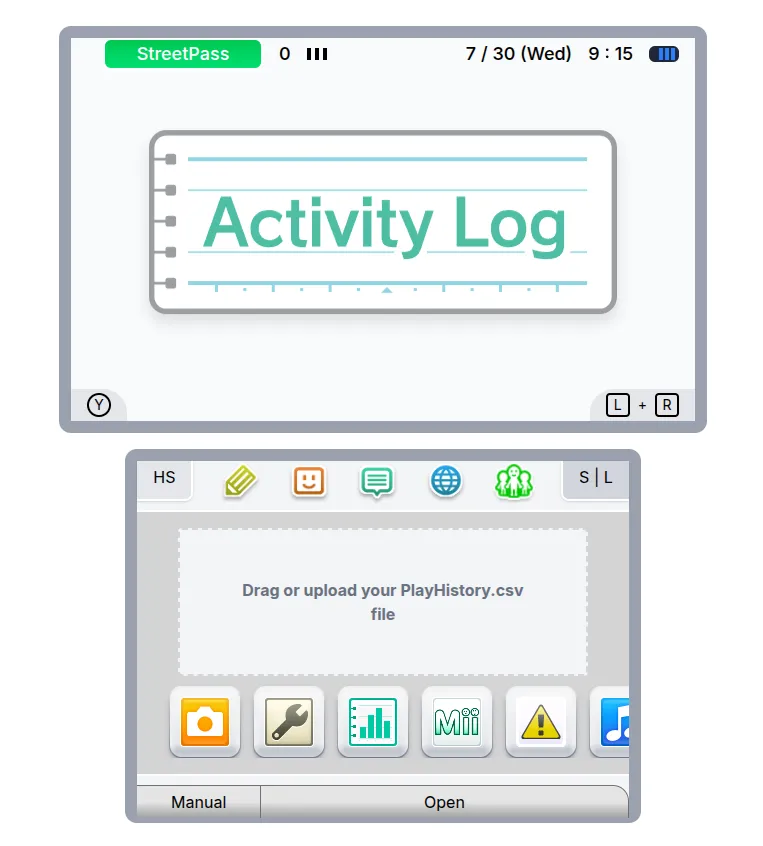
I designed the homepage of the application to look like the 3DS home menu, featuring a drag-and-drop file interface for uploading the PlayHistory.csv file, complete with the home menu BGM playing (which can be paused). However, vgmtreasurechest seems to have removed the track, so I might need to replace the URL soon. Following this, we have the Activity Log application homescreen, which is not documented, and I would rather not take any measures to document it here. The history screen looks something like this:
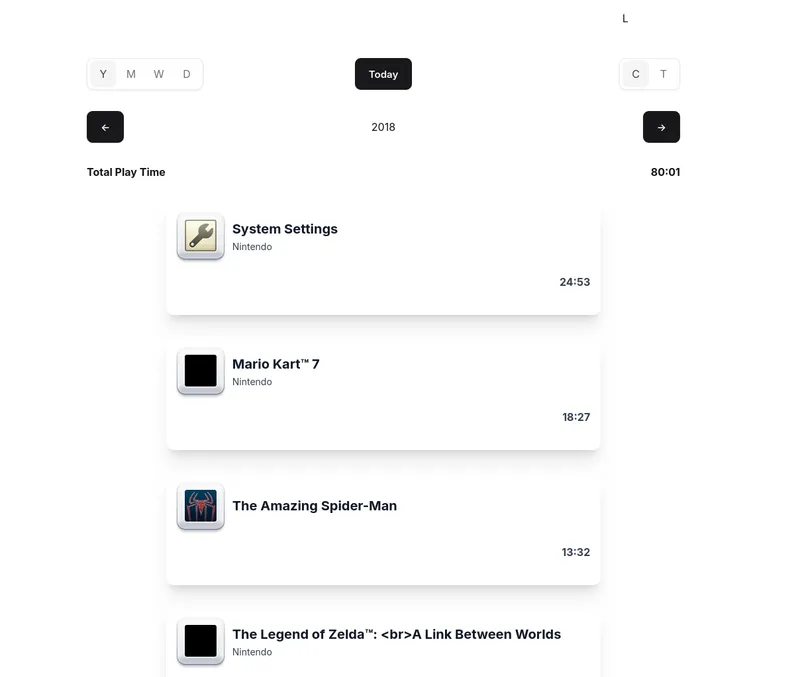
It is still in its early stages. I am currently listing the parsed data to mimic the Activity Log, but I also plan to add a timeline view since we have app launch and boot data available. The classic Activity Log music plays on these screens.
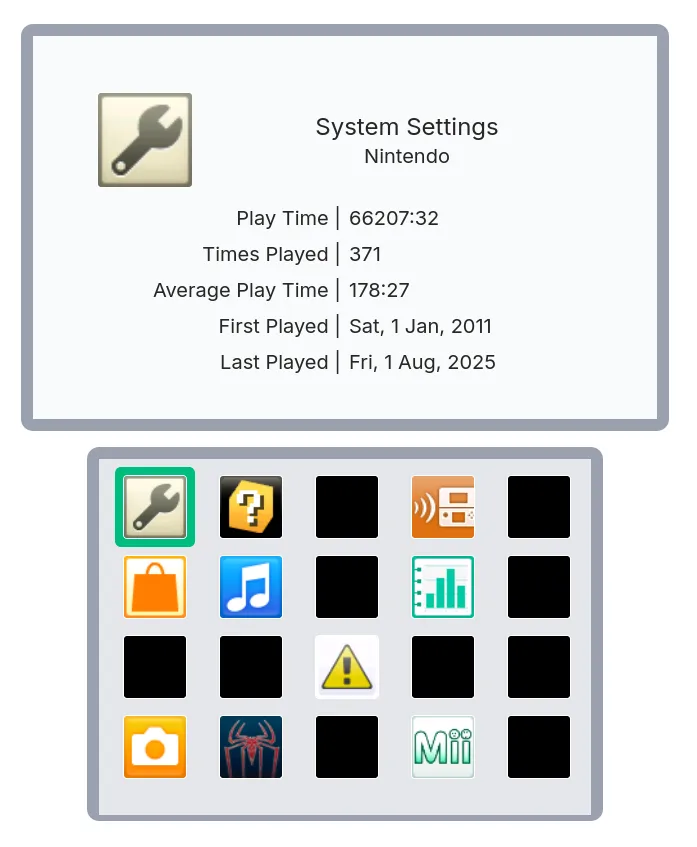
The title library is again much like the Activity Log, listing title icons by recency on the bottom screen and displaying information on the top. This highlights one of the biggest problems I have faced. I swear I haven’t played “System Settings” for 66 thousand hours! Trust me, only the Music player has minigames. While my parser is functional, it isn’t perfect. The PTM save data, and in turn the CSV file, contains missing records, and some records appear completely out of order.
My current logic is to register when an application is opened, and when it is closed, accumulate the number of minutes. Since the 3DS can only launch a single application at once (except for applets), this approach seemed foolproof, but it is clearly failing (as highlighted by the parsing errors my parser caught). For example, there are entries of applications launching while they are already running (because resume events exist).
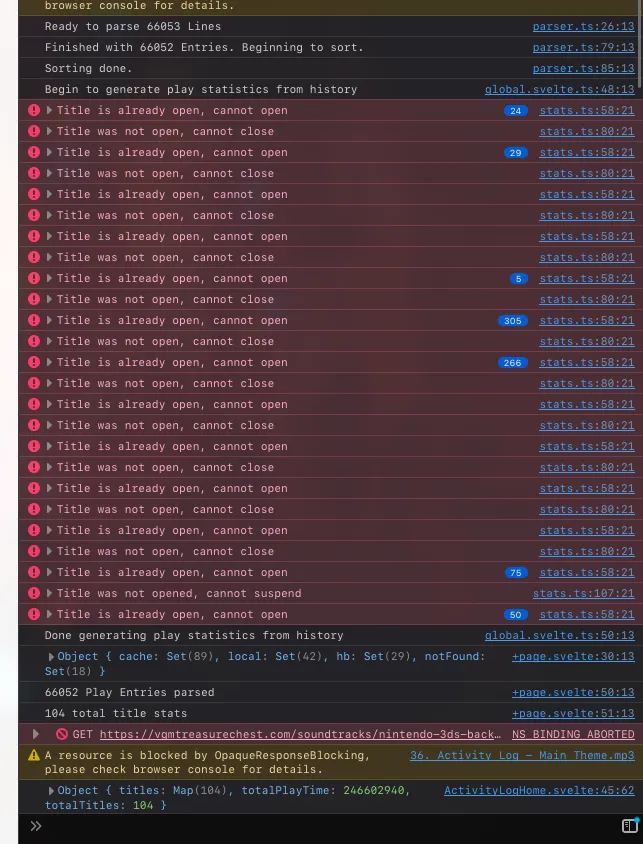
However, this is better than nothing! I can successfully parse and display Playtime History data outside of the 3DS. It’s a long journey before I can extract some meaningful data out of it, though. I might have better luck with the pld.dat save data. It’s the save data for the Activity Log application itself, and it seems like it pulls from the PTM save data to keep updating its own records. Initially, I avoided touching pld.dat for two reasons: first, it was less documented compared to PTM, and second, I thought going straight to the source of the data itself was a better idea. As we can see, it was probably not.
Conclusion
This was part 2 of the blog series about 3DS Activity Log. The next part will explain the new pld.dat, its data format and introduce the new parser, how I managed to extract it. Next time the application will hopefully improve and use the new parser.
Thanks for reading!
